Use your own devices
Phone, tablet or computer. No Zuno hardware to buy.
ZUNO RETAIL · YOUR SHOP, CONNECTEDZUNO RETAIL
Sell in store and online. Keep stock, customers and costs together.Sell in store and online. Keep track of your stock.
Retail Free · One user · No card required

Phone, tablet or computer. No Zuno hardware to buy.
Product images, descriptions and campaign ideas, in your app.
Add online ordering, campaign tools and optional Team when you need them.
Checkout, products, stock and customers for one user.
AT YOUR COUNTER
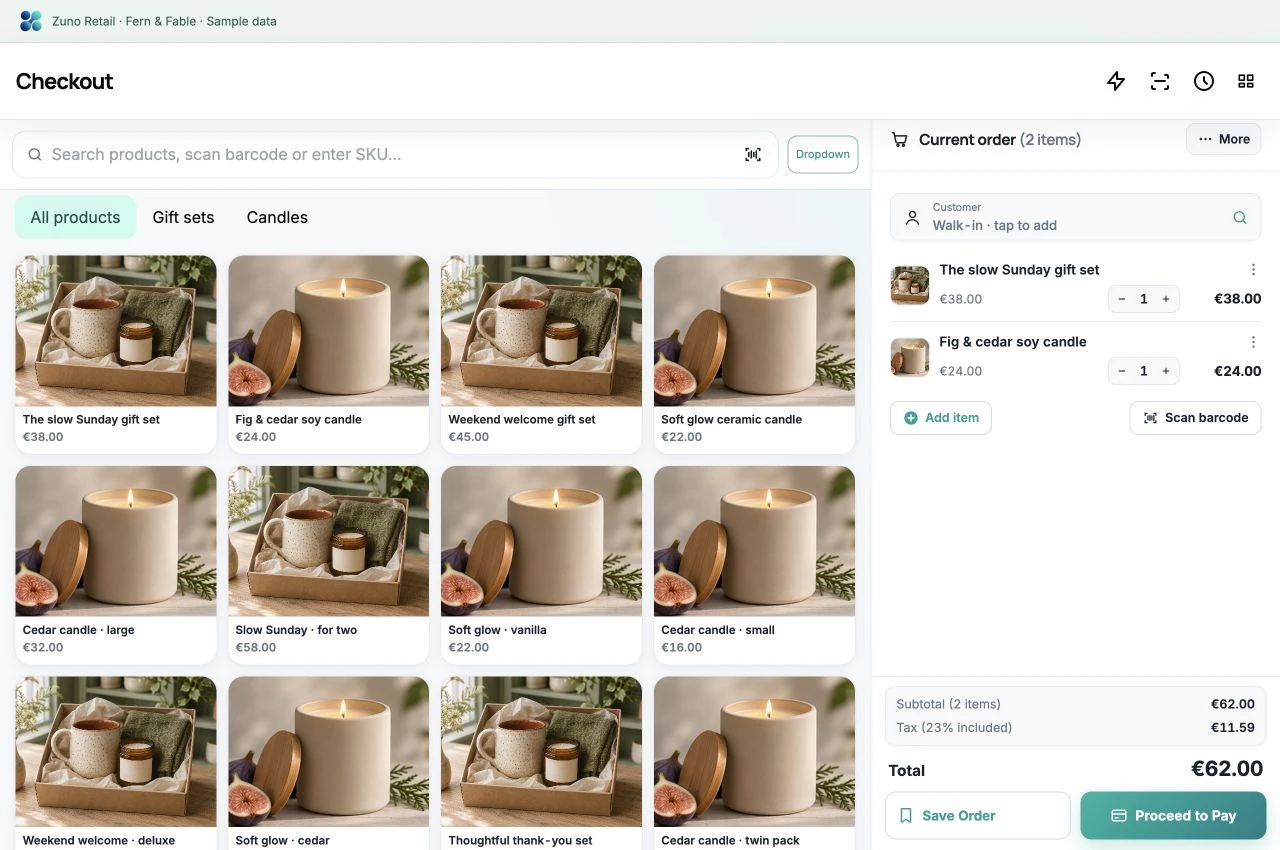
Find a product, build the basket and keep the sale moving.
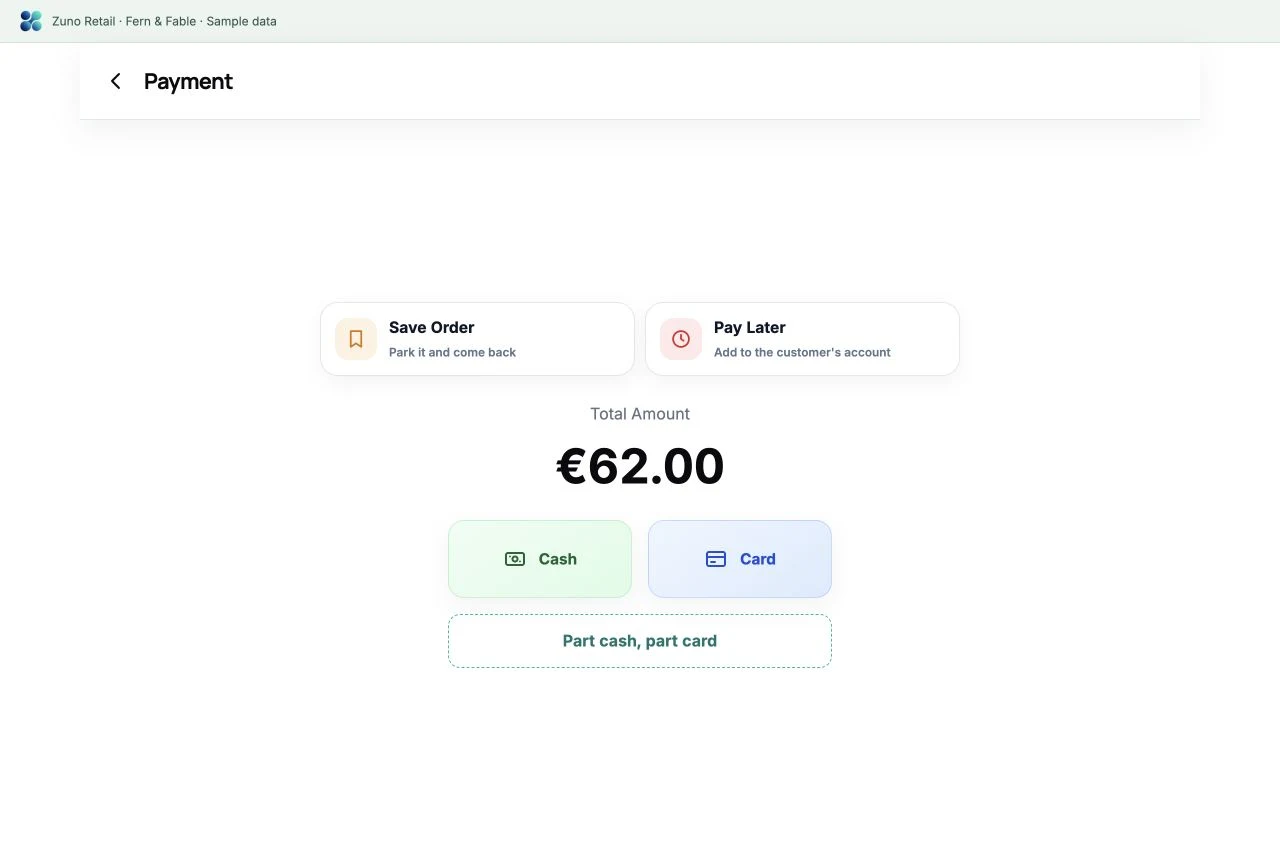
Record counter card payments taken on your own card machine. Pay Later and other advanced tools depend on your plan.
 Zuno Retail Sample shop
 Zuno Retail Sample shop
A MANAGER’S VIEW OF THE SHOP
See the products, prices and stock. Open one item’s Stock Movement to follow the sales, deliveries and adjustments behind its balance.
Products & stockSample data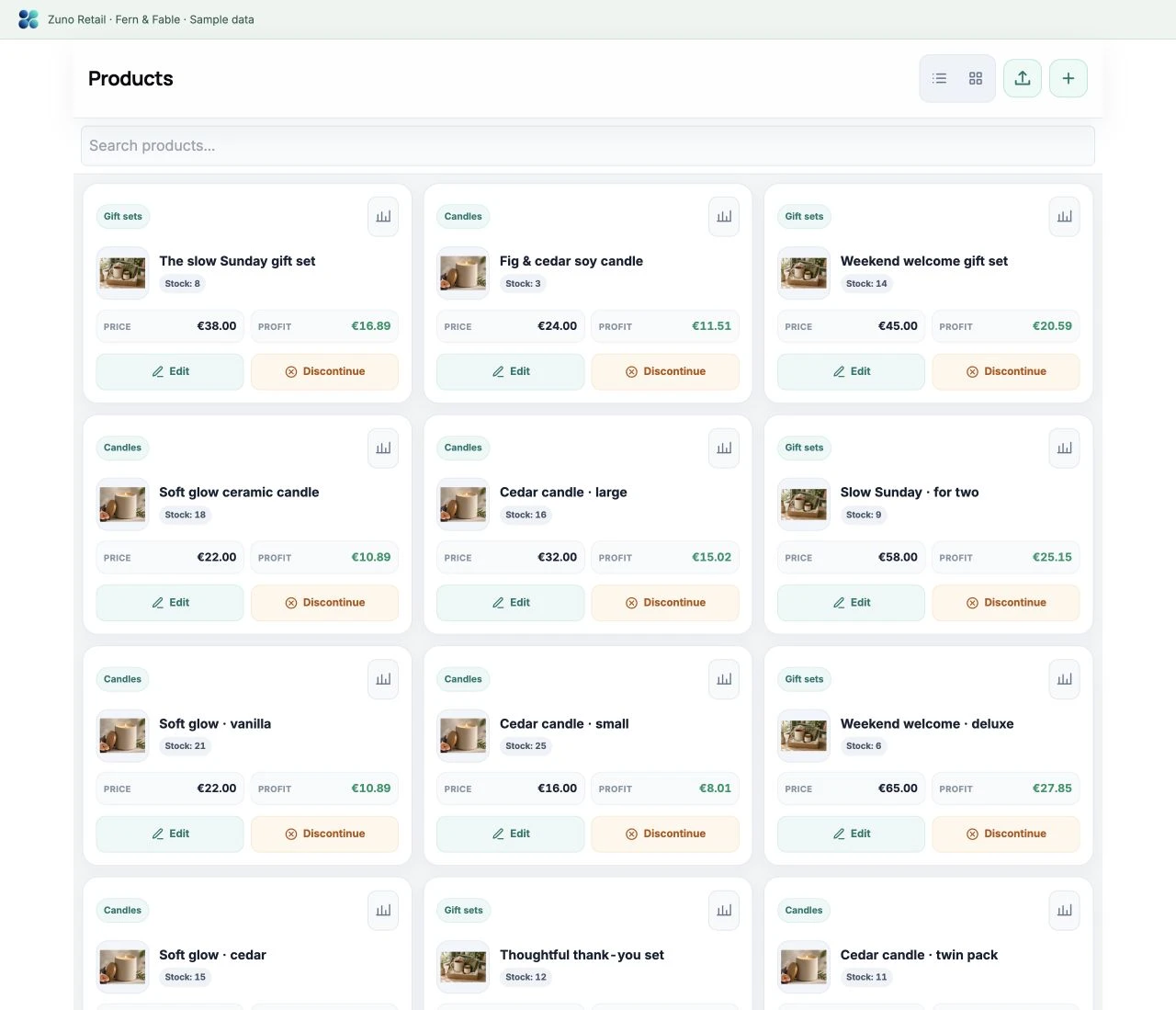 Selected item · Stock MovementSample data
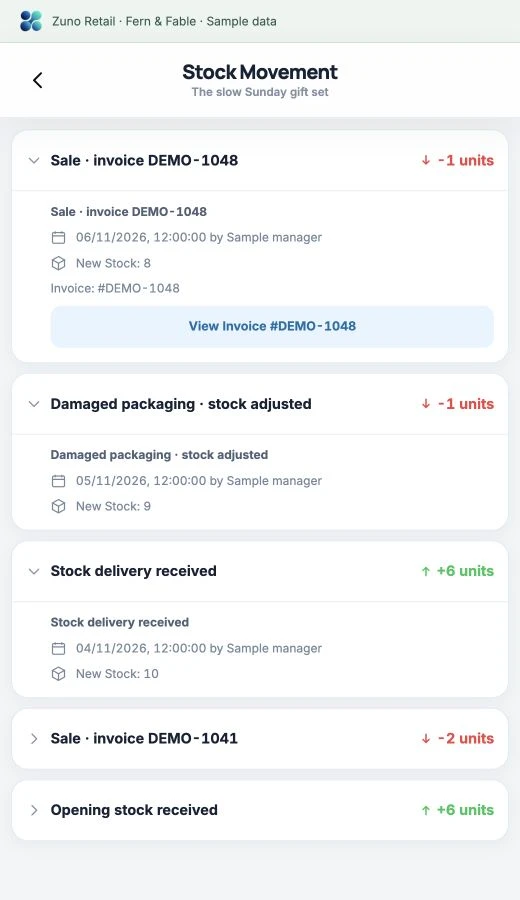
Stock history records sales, stock deliveries and adjustments; forecasts and reorder suggestions depend on recorded sales and your plan.
YOUR SHOP, BEYOND THE DOOR
Your own online shop. From their first click to collection or delivery.
Let customers order ahead and choose how to receive their purchase, where enabled.
Their order page shows progress from received to collection or delivery. Add delivery details or a parcel-tracking link when dispatching.
Online cards through your connected Stripe account, or payment on collection or delivery where enabled.
After an order is finished, the customer gets a private link to rate it and each item. You choose whether ratings show on your order page, and you can hide any review.
* Online payment requires setup and activation. Available where Stripe supports your country; each business uses its own Stripe account. Payment-provider processing fees apply. Online ordering requires an eligible plan.
Zuno Retail Sample shop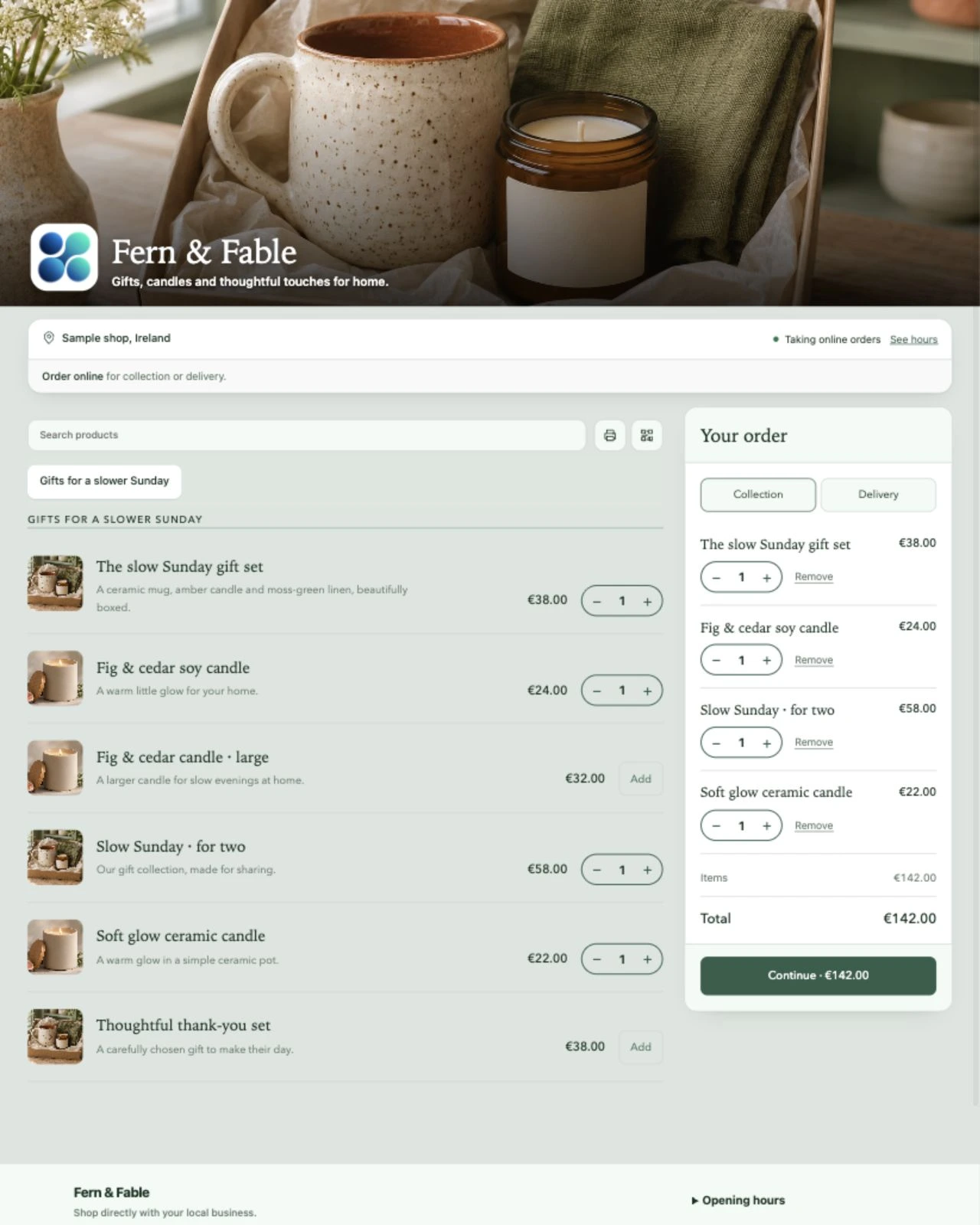
THE BUSINESS BEHIND THE COUNTER
Less jumping between lists. More of your shop working together.
Log rent, utilities and supplies. Find spending by vendor, category or date.
Review sales, payments, tax and cash figures, with the day’s details together.
Keep customer history and balances alongside the sale.
Give staff the permissions they need for their part of the working day.
Reports, exports and staff access depend on your plan and permissions.
ZUNO RETAIL ANALYTICS
Sales, products, costs and payment trends, together. Explore a sample shop, or ask AI a question about the numbers.
AI access depends on your plan. Explore the preview with sample data.
Explore the larger demo ↗ Zuno Analytics Live sampleZUNO AI DESIGNER · FOR YOUR SHOP
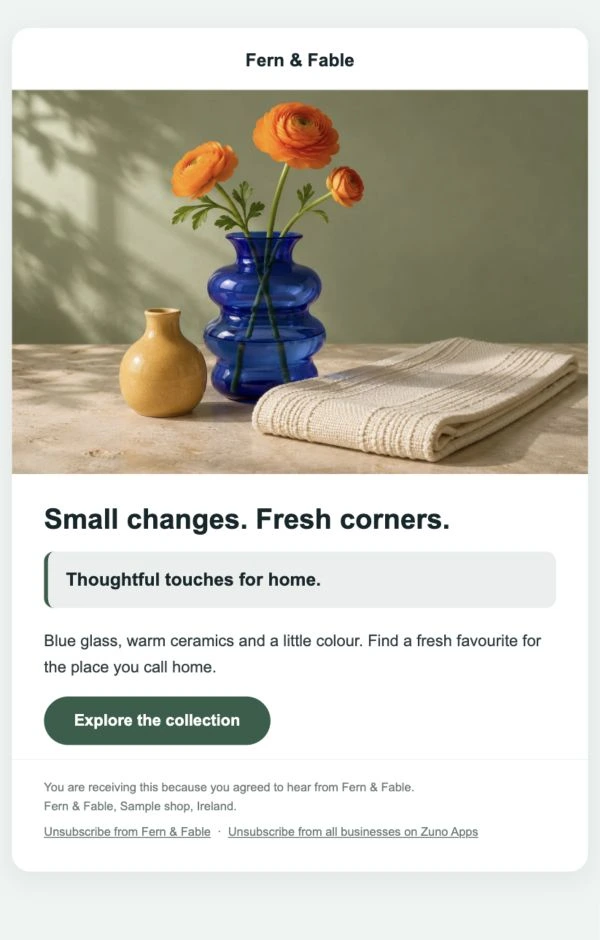
Your products. Your shop’s voice. Create imagery, descriptions, email campaigns and social captions inside Zuno, then review and make them yours.
“Sculptural blue glass that catches the light. A statement vase for fresh stems or a favourite shelf.”
“A fresh favourite for your favourite corner. Discover blue glass, warm ceramics and thoughtful touches for home.”
Make it yours before publishing or sending. AI and email allowances depend on your plan; campaign emails go to opted-in customers.
Add Team for rotas, clock-ins and worked hours.
Explore Team →In-app AI help and support when you need a hand.
WHEN YOUR SHOP GROWS
Bring your setup to another location. Keep each business’s records separate, with subscription billing together.
A SMALL START. MORE POSSIBILITIES.
Create your account in the browser.
Let AI help with images and descriptions on eligible plans.
Use your own phone, tablet or computer.
Web is live · iOS in testing · Android coming soon
Plans
Start with Retail Free for one user. Choose an eligible paid plan when you need more.
Loading plans…
A little clarity
Use any phone, tablet or computer. Bring your own receipt printer and card machine. Zuno does not sell hardware; counter card payments are taken on your own machine and recorded in the app.
Yes. Retail Free includes checkout, products, stock and customers for one user, with no card required. See the current plans for paid features and trial availability.
Use Log in at the top or bottom of any page. It opens the Zuno app, where you can sign in or create an account.
MAKE IT YOUR OWN
Start free. Add more when it fits your business.
Online payments
Zuno works with Stripe. Each business connects its own Stripe account, customers pay by card, and the money goes straight to the business in its own currency.
 Ireland
 United Kingdom
 Austria
 Belgium
 Bulgaria
 Croatia
 Cyprus
 Czechia
 Denmark
 Estonia
 Finland
 France
 Germany
 Gibraltar
 Greece
 Hungary
 Italy
 Latvia
 Liechtenstein
 Lithuania
 Luxembourg
 Malta
 Netherlands
 Norway
 Poland
 Portugal
 Romania
 Slovakia
 Slovenia
 Spain
 Sweden
 Switzerland
 United States
 Canada
 Mexico
 Australia
 New Zealand
 Hong Kong
 Japan
 Singapore
 Thailand
 United Arab Emirates
Stripe decides for each business whether it can open an account, and its own fees apply. Not on the list? Online ordering and booking still work: customers pay on collection or at the venue, and the till takes cash and card anywhere.